Miniature Hedgehog Close-Up - AI Generated Image with Fictional

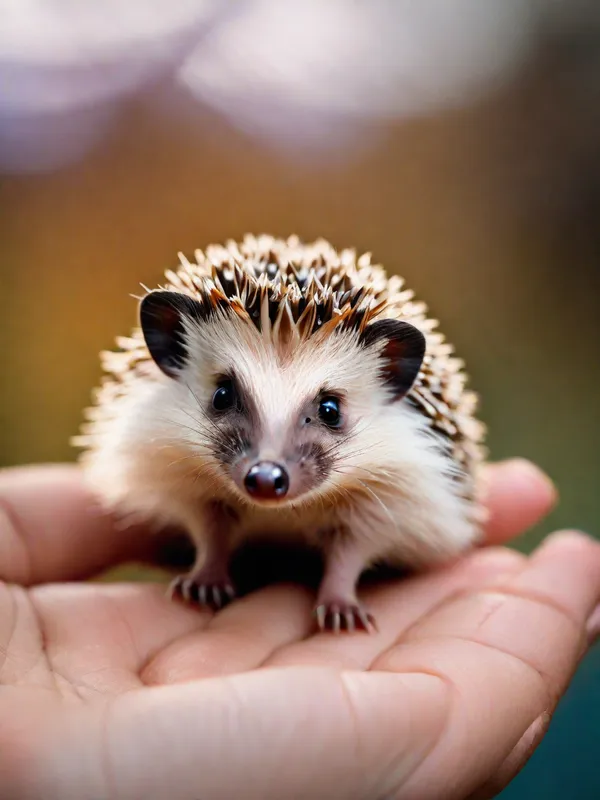
Miniature Hedgehog Close-Up - Tiny Hedgehog:Capture a close-up shot with a shallow depth of field, showcasing a tiny, finger-sized hedgehog resting gently on human fingers. Emphasize fine textures of its delicate spines, with soft shadows enhancing the miniature creature's details. Background blur adds depth, drawing attention to the animal's curious face and tiny features. - AI image generated with Fictional - vivid colors, photorealistic, close-up

Miniature Hedgehog Close-Up

Tiny Hedgehog:Capture a close-up shot with a shallow depth of field, showcasing a tiny, finger-sized hedgehog resting gently on human fingers. Emphasize fine textures of its delicate spines, with soft shadows enhancing the miniature creature's details. Background blur adds depth, drawing attention to the animal's curious face and tiny features.

Vivid colors
Photorealistic
close-up
Fictional, Size: 768 x 1024
 0 Likes
 10 Views
⭐⭐⭐⭐⭐
Tangra is an impressive AI-powered image generator that stands out for its versatility and ease of use. It provides copyright-free images, making it a fantastic tool for creatives, marketers, and professionals alike. Available on popular platforms like Microsoft, Canva, and Apple, Tangra ensures accessibility and seamless integration with existing workflows.

Similar AI-Generated Images

Discover more images created with similar styles, themes, and AI models


Frequently Asked Questions

Can I use the AI-generated images commercially?

Yes. All images created with Tangra AI are copyright-free and fully approved for commercial use, with no attribution required.

What AI models are used to create these images?

Tangra AI uses a curated mix of the best-performing industry models like Flux, DALL·E, Imagen, Nano Banana, and Stable Diffusion alongside our own proprietary models to deliver consistently high-quality, production-ready images.

Can I edit the images after they are generated?

Yes. Tangra AI includes powerful editing tools that let you refine and adjust your images after they're generated.