

Spiderweb Community Layout - AI Generated Image with Photorealistic 2

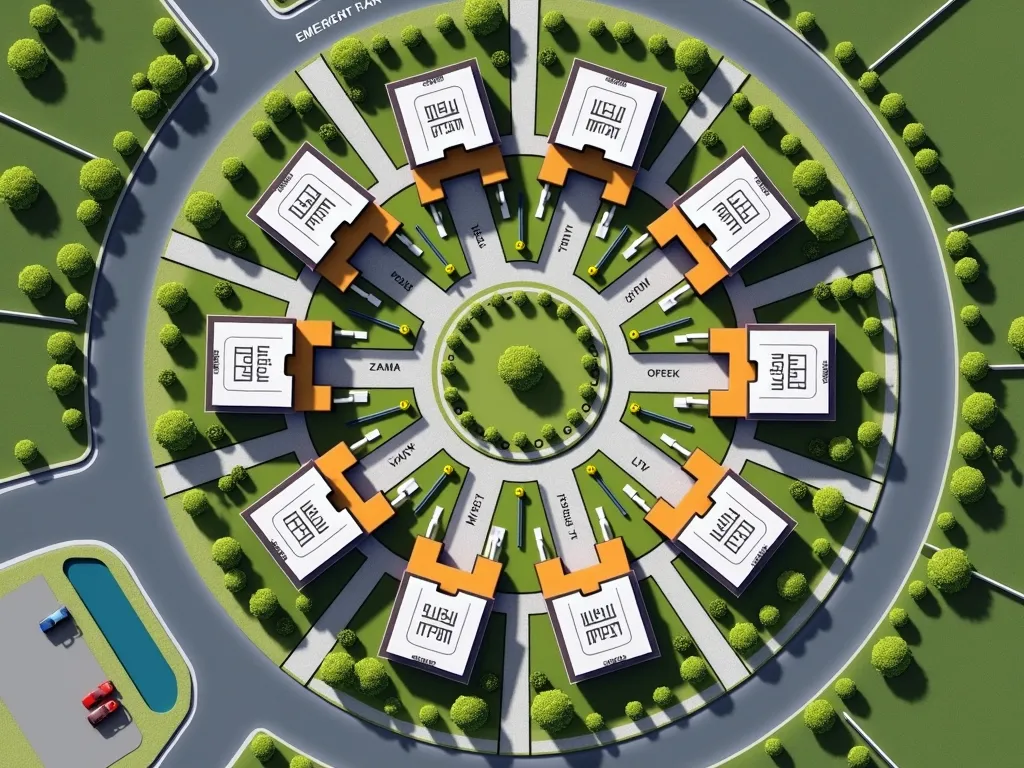
Spiderweb Community Layout - MASTERPLAN "Block D" LAYOUT (Top-Down View)
1. Outline the Main Zones
Draw a large circular area to represent the "Spiderweb Layout".
Mark the center point as the “Central Hub”.
Draw radial roads (spokes) coming out from the center (around 6–8 spokes).
Add 3–4 ring roads (like a spiderweb), connecting the radial roads.
2. Inside the Spiderweb (Housing & Internal Facilities)
Along the outer ring roads, draw the connected semi-detached houses (2 units each).
Each house should have:
Small flammable storage box
Drainage perimeter lines
Nearby solar streetlights
Between clusters: mark trees or green zones.
3. At the Central Hub
Emergency Bell Tower
Small community park or green garden
Directional signposts
4. Facilities Around the Outer Ring
Humana School (Stage 1 & 2) with classrooms, toilets, garden
Cherche (for kids below 6 years) with play zone and fence
Community Hall / Emergency Shelter (raised structure)
5. Outer Area (Beyond Housing Ring)
At the Main Entrance:
Main Gate (Yellow-Black striped with tractor/car barrier)
Big Board Area:
Left: Safety Info Board
Right: Daily Info Board
Bus Stop beside the board
Waste Management Point (with labeled bins)
Parking Lot for cars/motorbikes (shaded, near gate)
Other Facilities:
Main Store (daily needs)
Kitchen Gas Store (far from houses, fenced, hazard signs)
Genset Area (fenced, ventilated)
Water Filtration Machine Station
Refresh Pond (for clean environment & overflow water)
6. Signage & Safety Zones
Place hazard signs at:
Gas Store
Genset Area
Flammable boxes
Water treatment plant
Add solar lights throughout the layout
Clearly label each building and road", make it into a layout map showing all the details and labels, i need it to present the image layout, make me a landscape image for it please - AI image generated with Photorealistic 2

Spiderweb Community Layout

MASTERPLAN "Block D" LAYOUT (Top-Down View) 1. Outline the Main Zones Draw a large circular area to represent the "Spiderweb Layout". Mark the center point as the “Central Hub”. Draw radial roads (spokes) coming out from the center (around 6–8 spokes). Add 3–4 ring roads (like a spiderweb), connecting the radial roads. 2. Inside the Spiderweb (Housing & Internal Facilities) Along the outer ring roads, draw the connected semi-detached houses (2 units each). Each house should have: Small flammable storage box Drainage perimeter lines Nearby solar streetlights Between clusters: mark trees or green zones. 3. At the Central Hub Emergency Bell Tower Small community park or green garden Directional signposts 4. Facilities Around the Outer Ring Humana School (Stage 1 & 2) with classrooms, toilets, garden Cherche (for kids below 6 years) with play zone and fence Community Hall / Emergency Shelter (raised structure) 5. Outer Area (Beyond Housing Ring) At the Main Entrance: Main Gate (Yellow-Black striped with tractor/car barrier) Big Board Area: Left: Safety Info Board Right: Daily Info Board Bus Stop beside the board Waste Management Point (with labeled bins) Parking Lot for cars/motorbikes (shaded, near gate) Other Facilities: Main Store (daily needs) Kitchen Gas Store (far from houses, fenced, hazard signs) Genset Area (fenced, ventilated) Water Filtration Machine Station Refresh Pond (for clean environment & overflow water) 6. Signage & Safety Zones Place hazard signs at: Gas Store Genset Area Flammable boxes Water treatment plant Add solar lights throughout the layout Clearly label each building and road", make it into a layout map showing all the details and labels, i need it to present the image layout, make me a landscape image for it please

Photorealistic 2, Size: 1024 x 768
 2 Likes
 14 Views
⭐⭐⭐⭐⭐

All I need is available in this tool!

I'd tried most of the popular GenAI tools and none was quite what I needed. When I found Tangra AI, I stopped searching - it just has everything I need and then some!

Similar AI-Generated Images

Discover more images created with similar styles, themes, and AI models


Frequently Asked Questions

Can I use the AI-generated images commercially?

Yes. All images created with Tangra AI are copyright-free and fully approved for commercial use, with no attribution required.

What AI models are used to create these images?

Tangra AI uses a curated mix of the best-performing industry models like Flux, DALL·E, Imagen, Nano Banana, and Stable Diffusion alongside our own proprietary models to deliver consistently high-quality, production-ready images.

Can I edit the images after they are generated?

Yes. Tangra AI includes powerful editing tools that let you refine and adjust your images after they're generated.