


Spring Orjena Campaign - AI Generated Image with Text

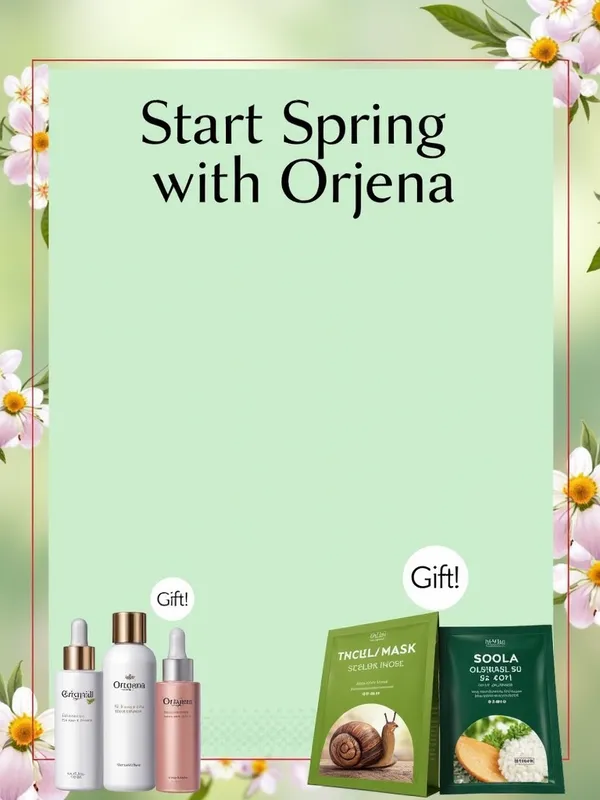
Spring Orjena Campaign - "Start Spring with Orjena" Campaign Visual
1. General Settings
Design Type: Poster (A4) or Instagram Post (1080x1080 pixels).

Prompt (for AI): "A spring-themed cosmetic campaign poster: pastel green background, floral patterns, modern and elegant design. Highlight skincare products and mask gifts."

2. Background
Instruction:
"Choose a pastel green background. Add slightly blurred floral patterns (cherry blossom or daisy). It can also be a soft nature image to create a spring atmosphere."

Canva Step: Elements > Backgrounds > Search "Pastel Green" or "Floral" and select a suitable one.

3. Title
Instruction:
"Write 'Start Spring with Orjena' at the top of the visual. Use a large, elegant, and modern font (e.g., Montserrat or Playfair Display). The text color should be white or dark green."

Canva Step: Text > Add Heading > Enter text > Set font and color.

4. Main Message
Instruction:
"Write 'Buy one, get your mask, buy two, refresh!' below the title. Choose a medium-sized, readable font (e.g., Open Sans). The color should contrast with the background (dark green or black)."

Canva Step: Text > Add Subheading > Enter text > Set font and color.

5. Product and Gift Images
Instruction:
"Add images of 2 Orjena products (e.g., serum and moisturizer bottles) to the bottom left of the visual. Place images of Snail Mask Sheet and Rice Mask Sheet packages on the bottom right. Add a small 'Gift!' bubble or label on the masks."

Canva Step:
Uploads > Upload Orjena product and mask images (if not available, search Elements > 'Skincare Products' and use similar ones).

Elements > Add 'Speech Bubble' > Write 'Gift!' > Place on masks.

6. Details
Instruction:
"Write 'March 1 - March 31 | Valid on all Orjena products' at the very bottom of the visual. Use a small but readable font (e.g., Arial). The color should be dark gray or black to match the background."

Canva Step: Text > Add Body Text > Enter text > Set font and color.

7. Brand Identity
Instruction:
"Add the Orjena logo to the top right corner (if you don't have a logo, stylize the text 'Orjena' as a logo). Write 'The only K-Beauty brand in Northern Cyprus' in small font next to or below it."

Canva Step: Uploads > Upload logo > Text > Add a small description.

8. Extra Touches
Instruction:
"Use a slight glow or shadow effect on the 'Snail Mask Sheet' and 'Rice Mask Sheet' texts. Add a thin spring branch or leaf pattern to the edges of the visual. Write 'Waiting for you at pharmacies!' in the bottom corner."

Canva Step:
Text > Effects > Select Glow or Shadow.

Elements > Search 'Leaves' or 'Floral Border' and place on edges.

Text > Add a small call to action.

9. Final Check
Instruction:
"Ensure all elements are cohesive. Texts should be readable, images clear, and the theme should match the spring atmosphere." - AI image generated with Text

Spring Orjena Campaign

"Start Spring with Orjena" Campaign Visual 1. General Settings Design Type: Poster (A4) or Instagram Post (1080x1080 pixels). Prompt (for AI): "A spring-themed cosmetic campaign poster: pastel green background, floral patterns, modern and elegant design. Highlight skincare products and mask gifts." 2. Background Instruction: "Choose a pastel green background. Add slightly blurred floral patterns (cherry blossom or daisy). It can also be a soft nature image to create a spring atmosphere." Canva Step: Elements > Backgrounds > Search "Pastel Green" or "Floral" and select a suitable one. 3. Title Instruction: "Write 'Start Spring with Orjena' at the top of the visual. Use a large, elegant, and modern font (e.g., Montserrat or Playfair Display). The text color should be white or dark green." Canva Step: Text > Add Heading > Enter text > Set font and color. 4. Main Message Instruction: "Write 'Buy one, get your mask, buy two, refresh!' below the title. Choose a medium-sized, readable font (e.g., Open Sans). The color should contrast with the background (dark green or black)." Canva Step: Text > Add Subheading > Enter text > Set font and color. 5. Product and Gift Images Instruction: "Add images of 2 Orjena products (e.g., serum and moisturizer bottles) to the bottom left of the visual. Place images of Snail Mask Sheet and Rice Mask Sheet packages on the bottom right. Add a small 'Gift!' bubble or label on the masks." Canva Step: Uploads > Upload Orjena product and mask images (if not available, search Elements > 'Skincare Products' and use similar ones). Elements > Add 'Speech Bubble' > Write 'Gift!' > Place on masks. 6. Details Instruction: "Write 'March 1 - March 31 | Valid on all Orjena products' at the very bottom of the visual. Use a small but readable font (e.g., Arial). The color should be dark gray or black to match the background." Canva Step: Text > Add Body Text > Enter text > Set font and color. 7. Brand Identity Instruction: "Add the Orjena logo to the top right corner (if you don't have a logo, stylize the text 'Orjena' as a logo). Write 'The only K-Beauty brand in Northern Cyprus' in small font next to or below it." Canva Step: Uploads > Upload logo > Text > Add a small description. 8. Extra Touches Instruction: "Use a slight glow or shadow effect on the 'Snail Mask Sheet' and 'Rice Mask Sheet' texts. Add a thin spring branch or leaf pattern to the edges of the visual. Write 'Waiting for you at pharmacies!' in the bottom corner." Canva Step: Text > Effects > Select Glow or Shadow. Elements > Search 'Leaves' or 'Floral Border' and place on edges. Text > Add a small call to action. 9. Final Check Instruction: "Ensure all elements are cohesive. Texts should be readable, images clear, and the theme should match the spring atmosphere."

Text, Size: 768 x 1024
 2 Likes
 20 Views
⭐⭐⭐⭐⭐
What surprised me about my first experience with Tangra AI? How easy to use it is. Simplicity.

Similar AI-Generated Images

Discover more images created with similar styles, themes, and AI models


Frequently Asked Questions

Can I use the AI-generated images commercially?

Yes. All images created with Tangra AI are copyright-free and fully approved for commercial use, with no attribution required.

What AI models are used to create these images?

Tangra AI uses a curated mix of the best-performing industry models like Flux, DALL·E, Imagen, Nano Banana, and Stable Diffusion alongside our own proprietary models to deliver consistently high-quality, production-ready images.

Can I edit the images after they are generated?

Yes. Tangra AI includes powerful editing tools that let you refine and adjust your images after they're generated.