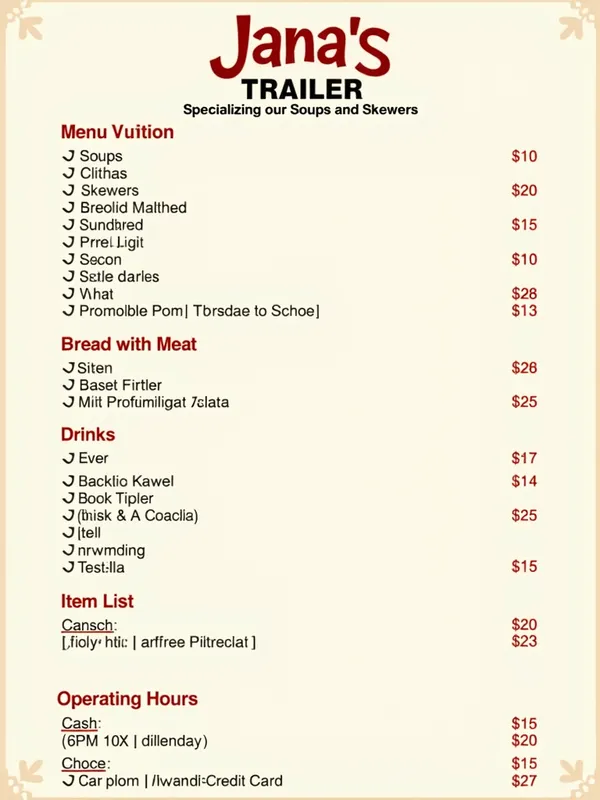
Jana's Trailer Menu - AI Generated Image with Text

Jana's Trailer Menu - **Prompt for Canva (9:16 Format):**

**Objective:** Create a clean and organized vertical menu for **Jana's Trailer**, specializing in soups and skewers, in the 9:16 format (1080x1920 pixels).

**Instructions:**
1. **Design Size:** 9:16 format (1080x1920 pixels).
2. **Color Palette:** Use neutral and soft colors like white, beige, and light brown, with red or orange details to highlight prices and titles.
3. **Font:** Choose a modern and readable font for the title **"Jana's Trailer"** and simple fonts for the rest of the text.

**Design Elements:**
1. **Header:**
   - Main title: **"Jana's Trailer"** (large and centered font).
   - Subtitle: **"Specializing in Soups and Skewers"** (smaller font, below the title).

2. **Menu Sections:**
   - Divide the menu into clear and well-organized sections:
     - **Soups**
     - **Skewers**
     - **Bread with Meat**
     - **Drinks**
     - **Promotional Combos**
   - Use bold section titles aligned to the left.

3. **Item List:**
   - For each item, include:
     - Dish name (normal font).
     - Brief description (smaller font and italicized).
     - Price (highlighted font and aligned to the right).
   - Use adequate spacing for easy reading.

4. **Footer:**
   - Include important information:
     - **Operating Hours:** 6 PM to 11 PM (Tuesday to Sunday).
     - **Payment Methods:** Cash, PIX, Debit/Credit Card. - AI image generated with Text

Jana's Trailer Menu

**Prompt for Canva (9:16 Format):** **Objective:** Create a clean and organized vertical menu for **Jana's Trailer**, specializing in soups and skewers, in the 9:16 format (1080x1920 pixels). **Instructions:** 1. **Design Size:** 9:16 format (1080x1920 pixels). 2. **Color Palette:** Use neutral and soft colors like white, beige, and light brown, with red or orange details to highlight prices and titles. 3. **Font:** Choose a modern and readable font for the title **"Jana's Trailer"** and simple fonts for the rest of the text. **Design Elements:** 1. **Header:** - Main title: **"Jana's Trailer"** (large and centered font). - Subtitle: **"Specializing in Soups and Skewers"** (smaller font, below the title). 2. **Menu Sections:** - Divide the menu into clear and well-organized sections: - **Soups** - **Skewers** - **Bread with Meat** - **Drinks** - **Promotional Combos** - Use bold section titles aligned to the left. 3. **Item List:** - For each item, include: - Dish name (normal font). - Brief description (smaller font and italicized). - Price (highlighted font and aligned to the right). - Use adequate spacing for easy reading. 4. **Footer:** - Include important information: - **Operating Hours:** 6 PM to 11 PM (Tuesday to Sunday). - **Payment Methods:** Cash, PIX, Debit/Credit Card.

Text, Size: 768 x 1024
 1 Likes
 5 Views
⭐⭐⭐⭐⭐
As a small business owner, I don't have a large budget for graphic design. Tangra AI Image Generator has been a game-changer for me! I can create beautiful images in seconds for all my marketing needs, from social media posts to event flyers, holiday cards, and slides. Highly recommend it to anyone who wants their brand to stand out!

Similar AI-Generated Images

Discover more images created with similar styles, themes, and AI models


Frequently Asked Questions

Can I use the AI-generated images commercially?

Yes. All images created with Tangra AI are copyright-free and fully approved for commercial use, with no attribution required.

What AI models are used to create these images?

Tangra AI uses a curated mix of the best-performing industry models like Flux, DALL·E, Imagen, Nano Banana, and Stable Diffusion alongside our own proprietary models to deliver consistently high-quality, production-ready images.

Can I edit the images after they are generated?

Yes. Tangra AI includes powerful editing tools that let you refine and adjust your images after they're generated.