





Neutek Moulding Mastery - AI Generated Image with Text

Neutek Moulding Mastery - Visual Layout
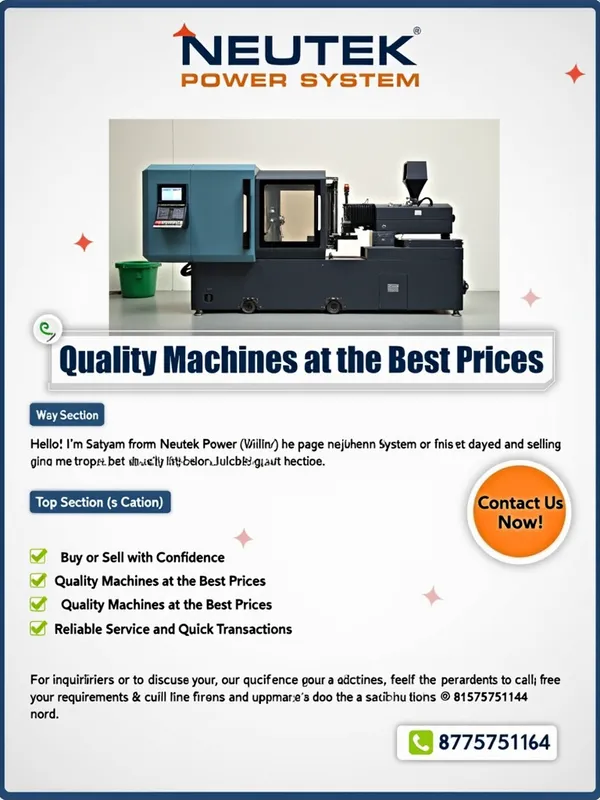
Background: Use a clean, professional background with a subtle gradient (e.g., light gray to white) to give a modern and sleek look. The focus should remain on the injection moulding machine.
Main Image: Place the provided photo of the injection moulding machine prominently in the center of the page. Enhance the image to HD quality by increasing sharpness, adjusting lighting to make it brighter, and removing any background clutter (like the boxes and green trash bin). The machine should look polished and ready for sale.
Branding: Add the Neutek Power System logo (if available) at the top center of the page. If there’s no logo, use bold, modern text in a professional font (e.g., Montserrat or Roboto) to write "Neutek Power System" in a dark blue or black color.
Text Overlay: Overlay a semi-transparent white banner across the bottom of the machine image with the tagline: "Quality Machines at the Best Prices" in bold, dark blue text.
Call to Action: On the right side of the page, add a bright button (e.g., orange or green) with the text "Contact Us Now!" in white. Below the button, include the phone number "📞 8755751164" in bold.
Additional Elements: Add small icons next to the bullet points (e.g., a checkmark for "Buy or Sell with Confidence," a dollar sign for "Quality Machines at the Best Prices," and a handshake for "Reliable Service and Quick Transactions") to make the text visually appealing.
Text Layout
Here’s how the text should be arranged on the page:

Top Section (Branding)

Neutek Power System

(in bold, large font, centered)

Main Section (Below the Machine Image)

Hello! 👋 I’m Satyam from Neutek Power System.

We specialize in the buying and selling of both old and new injection moulding machines.

✅ Buy or Sell with Confidence

✅ Quality Machines at the Best Prices

✅ Reliable Service and Quick Transactions

For inquiries or to discuss your requirements, feel free to reach out to us at

📞 8755751164

We look forward to doing business with you! 🚀

Neutek Power System

(in smaller font, centered at the bottom)

Design Tips for HD Quality
Use high-resolution fonts and icons to ensure clarity.
Adjust the lighting in the machine photo to make it look vibrant and professional.
Ensure the text is legible by using contrasting colors (e.g., dark text on a light background).
Keep the design clean and uncluttered to maintain a professional look - AI image generated with Text

Neutek Moulding Mastery

Visual Layout Background: Use a clean, professional background with a subtle gradient (e.g., light gray to white) to give a modern and sleek look. The focus should remain on the injection moulding machine. Main Image: Place the provided photo of the injection moulding machine prominently in the center of the page. Enhance the image to HD quality by increasing sharpness, adjusting lighting to make it brighter, and removing any background clutter (like the boxes and green trash bin). The machine should look polished and ready for sale. Branding: Add the Neutek Power System logo (if available) at the top center of the page. If there’s no logo, use bold, modern text in a professional font (e.g., Montserrat or Roboto) to write "Neutek Power System" in a dark blue or black color. Text Overlay: Overlay a semi-transparent white banner across the bottom of the machine image with the tagline: "Quality Machines at the Best Prices" in bold, dark blue text. Call to Action: On the right side of the page, add a bright button (e.g., orange or green) with the text "Contact Us Now!" in white. Below the button, include the phone number "📞 8755751164" in bold. Additional Elements: Add small icons next to the bullet points (e.g., a checkmark for "Buy or Sell with Confidence," a dollar sign for "Quality Machines at the Best Prices," and a handshake for "Reliable Service and Quick Transactions") to make the text visually appealing. Text Layout Here’s how the text should be arranged on the page: Top Section (Branding) Neutek Power System (in bold, large font, centered) Main Section (Below the Machine Image) Hello! 👋 I’m Satyam from Neutek Power System. We specialize in the buying and selling of both old and new injection moulding machines. ✅ Buy or Sell with Confidence ✅ Quality Machines at the Best Prices ✅ Reliable Service and Quick Transactions For inquiries or to discuss your requirements, feel free to reach out to us at 📞 8755751164 We look forward to doing business with you! 🚀 Neutek Power System (in smaller font, centered at the bottom) Design Tips for HD Quality Use high-resolution fonts and icons to ensure clarity. Adjust the lighting in the machine photo to make it look vibrant and professional. Ensure the text is legible by using contrasting colors (e.g., dark text on a light background). Keep the design clean and uncluttered to maintain a professional look

Text, Size: 768 x 1024
 2 Likes
 13 Views
⭐⭐⭐⭐⭐
Excellent! I'm having a blast! the images are great!

Similar AI-Generated Images

Discover more images created with similar styles, themes, and AI models


Frequently Asked Questions

Can I use the AI-generated images commercially?

Yes. All images created with Tangra AI are copyright-free and fully approved for commercial use, with no attribution required.

What AI models are used to create these images?

Tangra AI uses a curated mix of the best-performing industry models like Flux, DALL·E, Imagen, Nano Banana, and Stable Diffusion alongside our own proprietary models to deliver consistently high-quality, production-ready images.

Can I edit the images after they are generated?

Yes. Tangra AI includes powerful editing tools that let you refine and adjust your images after they're generated.