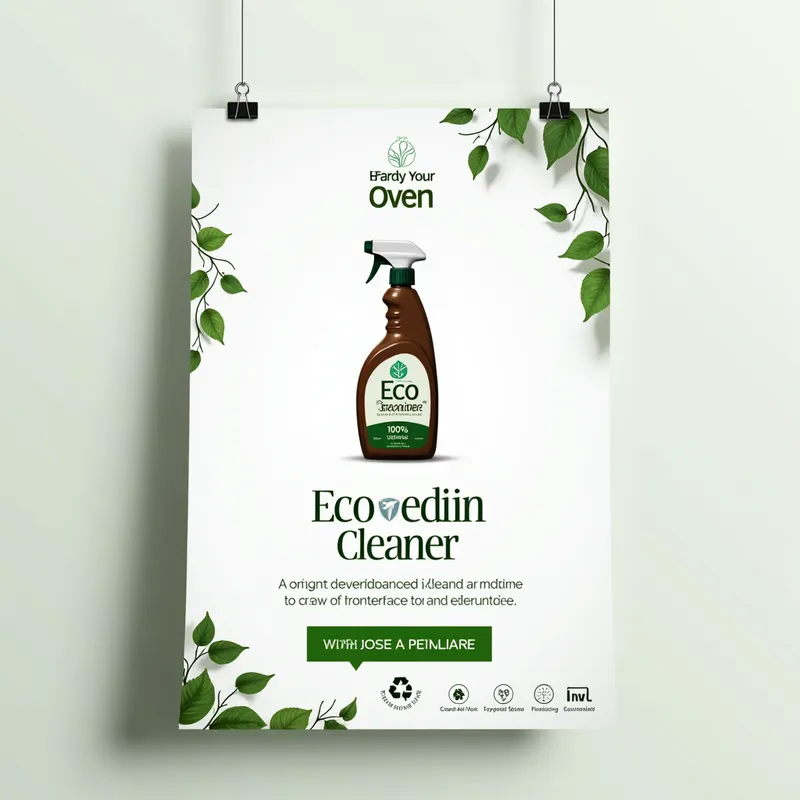
Eco Oven Cleaner Poster - AI Generated Image with Text

Eco Oven Cleaner Poster - Editable Design Guide for Eco-Friendly Oven Cleaner Poster
Canvas Setup

    Size: 1080x1080 pixels (for social media) or A4 size (8.27 × 11.69 inches) for print.
    Background Color: White with subtle gradient (optional).

Design Elements

    Background:
        Color: Clean, white, or light gradient (white to pale green).
        Decor: Subtle greenery like vines, leaves, or a soft texture of nature.

    Main Product (Spray Bottle):
        Place a sleek, minimalist bottle in the center.
        Label Design:
            Use eco-friendly tones: green, white, and light brown.
            Include a logo (if any) and a leaf motif.
            Text: "Eco Oven Cleaner" (title), "100% Natural Ingredients" (subtitle).

    Tagline:
        Text: "Clean Your Oven, Save the Planet!"
        Font: Rounded sans-serif for a clean, friendly feel.
        Colors: Green (#32CD32) and Blue (#1E90FF).
        Position: Below the product image, center-aligned.

    Icons:
        Recycling symbol, leaf graphics, and a water droplet to emphasize eco-friendliness.
        Place near the tagline or product.

    Call to Action:
        Text: "Eco Clean Starts Here" or "Shop Now."
        Place in a green button near the bottom.

    Additional Information:
        Small text: “Made with biodegradable ingredients” or “Safe for your home and the planet.”
        Position at the bottom of the poster in a smaller font.

Layers (For Editable Structure)

    Layer 1: Background and greenery.
    Layer 2: Product image (bottle).
    Layer 3: Tagline and supporting text.
    Layer 4: Icons and embellishments.
    Layer 5: Call-to-action button. - AI image generated with Text

More like this

Eco Oven Cleaner Poster

Editable Design Guide for Eco-Friendly Oven Cleaner Poster Canvas Setup Size: 1080x1080 pixels (for social media) or A4 size (8.27 × 11.69 inches) for print. Background Color: White with subtle gradient (optional). Design Elements Background: Color: Clean, white, or light gradient (white to pale green). Decor: Subtle greenery like vines, leaves, or a soft texture of nature. Main Product (Spray Bottle): Place a sleek, minimalist bottle in the center. Label Design: Use eco-friendly tones: green, white, and light brown. Include a logo (if any) and a leaf motif. Text: "Eco Oven Cleaner" (title), "100% Natural Ingredients" (subtitle). Tagline: Text: "Clean Your Oven, Save the Planet!" Font: Rounded sans-serif for a clean, friendly feel. Colors: Green (#32CD32) and Blue (#1E90FF). Position: Below the product image, center-aligned. Icons: Recycling symbol, leaf graphics, and a water droplet to emphasize eco-friendliness. Place near the tagline or product. Call to Action: Text: "Eco Clean Starts Here" or "Shop Now." Place in a green button near the bottom. Additional Information: Small text: “Made with biodegradable ingredients” or “Safe for your home and the planet.” Position at the bottom of the poster in a smaller font. Layers (For Editable Structure) Layer 1: Background and greenery. Layer 2: Product image (bottle). Layer 3: Tagline and supporting text. Layer 4: Icons and embellishments. Layer 5: Call-to-action button.

Text, Size: 1024 x 1024
 1 Likes
 139 Views

Make your own version

Start from this image's prompt and change anything you like.

Text
⭐⭐⭐⭐⭐
“As a small business owner, I don't have a large budget for graphic design. Tangra AI Image Generator has been a game-changer for me! I can create beautiful images in seconds for all my marketing needs, from social media posts to event flyers, holiday cards, and slides. Highly recommend it to anyone who wants their brand to stand out!”
— Nelly, Business Owner

Frequently Asked Questions

Can I use the AI-generated images commercially?

Yes. All images created with Tangra AI are copyright-free and fully approved for commercial use, with no attribution required.

What AI models are used to create these images?

Tangra AI uses a curated mix of the best-performing industry models, alongside our own proprietary models to deliver consistently high-quality, production-ready images.

Can I edit the images after they are generated?

Yes. Tangra AI includes powerful editing tools that let you refine and adjust your images after they're generated.

Can I generate images in a specific brand style?

Yes. You can guide the AI with brand logos, reference images, brand colors and visual aesthetics to produce images that align with a brand's identity.

Can I generate images in different styles and formats?

Absolutely. Tangra AI supports a wide range of styles, from realistic to futuristic, and you can choose from various formats to suit your needs.

Can I generate images in different resolutions?

Yes. Tangra AI allows you to generate images in various resolutions, including high-resolution options suitable for print and digital media.

Do I need design experience to create professional-quality images?

No. Tangra AI is designed for marketers, entrepreneurs, and business users. Simply describe what you want, and the AI generates professional-quality visuals from your instructions.

Are there any restrictions on the types of images I can generate?

Tangra AI has guidelines to ensure responsible use. You cannot generate content that is illegal, harmful, or violates the rights of others.