

Kitchen Affairs Policy Cover - AI Generated Image with Text

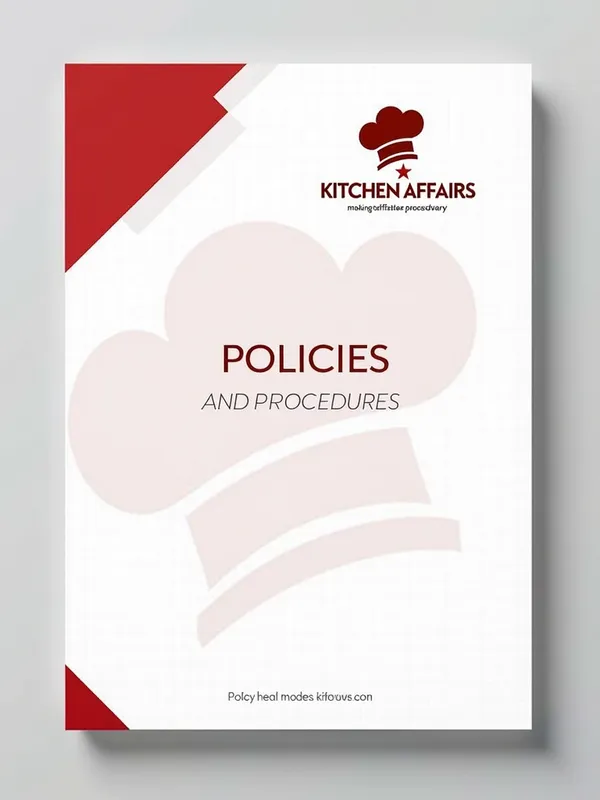
Kitchen Affairs Policy Cover - Here's a detailed AI prompt for designing the policy and procedure document cover:

```prompt
Design a professional A4 size cover page for Kitchen Affairs' Policy and Procedure document with the following specifications:

1. Header Elements:
- Place the Kitchen Affairs logo prominently at the top center
- Maintain the original red color scheme (#FF0000) from the logo
- Include the tagline "making life tastier..." below the logo

2. Document Title:
- Center-align "POLICIES AND PROCEDURES"
- Use a professional sans-serif font
- Position in the middle third of the page

3. Design Elements:
- Incorporate subtle culinary icons or chef hat motifs
- Use white space effectively for a clean, professional look
- Add a thin border in the brand's red color
- Include a subtle watermark of the chef's hat in the background

4. Footer Information:
- Company registration mark (®)
- Document version/date
- Confidentiality statement
- Contact information

5. Color Scheme:
- Primary: Kitchen Affairs Red
- Secondary: Black for text
- Tertiary: White background
- Optional: Light gray for decorative elements

6. Layout:
- Portrait orientation
- Standard A4 dimensions (210 × 297 mm)
- Professional margins (2.5 cm on all sides)

Please maintain brand consistency and create a design that reflects the professional and culinary nature of Kitchen Affairs while ensuring readability and corporate document standards.
` - AI image generated with Text

Kitchen Affairs Policy Cover

Here's a detailed AI prompt for designing the policy and procedure document cover: ```prompt Design a professional A4 size cover page for Kitchen Affairs' Policy and Procedure document with the following specifications: 1. Header Elements: - Place the Kitchen Affairs logo prominently at the top center - Maintain the original red color scheme (#FF0000) from the logo - Include the tagline "making life tastier..." below the logo 2. Document Title: - Center-align "POLICIES AND PROCEDURES" - Use a professional sans-serif font - Position in the middle third of the page 3. Design Elements: - Incorporate subtle culinary icons or chef hat motifs - Use white space effectively for a clean, professional look - Add a thin border in the brand's red color - Include a subtle watermark of the chef's hat in the background 4. Footer Information: - Company registration mark (®) - Document version/date - Confidentiality statement - Contact information 5. Color Scheme: - Primary: Kitchen Affairs Red - Secondary: Black for text - Tertiary: White background - Optional: Light gray for decorative elements 6. Layout: - Portrait orientation - Standard A4 dimensions (210 × 297 mm) - Professional margins (2.5 cm on all sides) Please maintain brand consistency and create a design that reflects the professional and culinary nature of Kitchen Affairs while ensuring readability and corporate document standards. `

Text, Size: 768 x 1024
 2 Likes
 20 Views
⭐⭐⭐⭐⭐

The easiest to use GenAI app

Love that it's super easy to get started. No complicated UI or overwhelming screens. Just entered my prompt, added a few of the predefined effects, and that was it. I got several ideas to choose from, selected a few of the prompts and created beautiful images.

Similar AI-Generated Images

Discover more images created with similar styles, themes, and AI models


Frequently Asked Questions

Can I use the AI-generated images commercially?

Yes. All images created with Tangra AI are copyright-free and fully approved for commercial use, with no attribution required.

What AI models are used to create these images?

Tangra AI uses a curated mix of the best-performing industry models like Flux, DALL·E, Imagen, Nano Banana, and Stable Diffusion alongside our own proprietary models to deliver consistently high-quality, production-ready images.

Can I edit the images after they are generated?

Yes. Tangra AI includes powerful editing tools that let you refine and adjust your images after they're generated.