

Tangra AI Image Generator
Create stunning visuals with your choice of the world's leading models.
Overview
Transform ideas into high-quality images with Tangra AI Image Generator. A powerful, easy-to-use tool built for creators who want premium output without complexity. You type a prompt (or use simple keyword search), optionally switch to Advanced Mode and add style "adorners," choose from a broad lineup of AI models, set size/quality options, and create images you fully own for personal or commercial use. Results land in a personal gallery where you can re-create, AI-edit, favorite, organize into lists, download as PNG, and share.
Who it’s for
- Content creators and social media managers needing on-brand visuals, thumbnails and infographics
- Marketers and small businesses creating product and ad imagery
- Designers and artists who want to compare many AI models in one place
- Bloggers, authors and presenters needing illustrations, covers and hero images
- Anyone needing copyright-free images for commercial use
Key features
Large multi-model lineup
Pick the engine from an in-input model selector grouped into tiers (Unlimited with Premium, Extra Credits, New). Includes Tangra's own Photorealistic, Photorealistic 2, Fictional, Text, Fast and Art models plus Flux, Flux 2 / Pro / Flex, Stable Diffusion XL, GPT Image / Pro / Mini, Nano Banana 2, 4K Pro, Seedream 4.0 / 4.5, Krea, HiDream Full, Titan 2.
Simple search vs Advanced Mode
Beginners type a few keywords and Tangra builds the full prompt for them; an Advanced Mode toggle exposes a free-form prompt box (up to 2000 characters) for full creative control.
Style adorners
One-click prompt enhancers grouped as Trick, Photography, Art Styles, Artists, Effects and Views that add tags to your prompt to steer composition, medium and look.
Fine-grained image settings
A settings panel lets you set aspect ratio/size, exact width and height, generation steps, an optional fixed seed for reproducibility, and the number of images to create per run.
Reference-image / AI editing models
Models such as GPT Image, Nano Banana 2, Seedream and the Pro model accept uploaded reference images (drag-drop, paste, file, gallery, or phone-via-QR) so you can edit, restyle or build on existing pictures.
Personal gallery with organization
Every generation is saved under My Images with re-create, AI Edit, like/favorite, rename, delete and bulk select/move/download. Paid users get an AI-powered Organizer plus custom Lists and Favorites.
Full-screen viewer with download & share
Open any image full-screen to view info, download a high-resolution PNG, share via link, AI-edit, like, and page through the rest of the group.
Credits, rewards and unlimited plans
A credits wallet powers paid models; users can claim game and referral rewards (50 credits per referred signup), and Premium/Ultimate subscriptions unlock unlimited generations on Tangra's own models plus priority queueing.
How to use it — step by step
- Open the generatorGo to https://tangra.link/images (or the app). The landing page shows the prompt box, a gallery of community examples, and a sign-in prompt.
- Sign in to createClick 'Log in to create' to authenticate (Google, Microsoft or passwordless email). Logging in unlocks your personal gallery, credits and saving; a guest option is available in some app contexts.
- Describe your imageType what you want into the prompt field. Leave Advanced Mode off to let Tangra expand your keywords into a full prompt, or toggle Advanced Mode on to write the exact prompt yourself. You can also dictate with the microphone input.
- Pick an AI modelUse the model selector inside the input to choose an engine (e.g. Photorealistic, Flux, GPT Image, Nano Banana 2, Seedream). The selector shows credit cost and groups models by plan tier.
- Add style and tune settings (optional)Click adorner buttons (Photography, Art Styles, Artists, Effects, Views, Trick) to add style tags, then open the settings gear to set size/aspect ratio, width/height, steps, seed, number of images, and attach reference images for editing models.
- CreateClick Create (the button shows the credit cost). Your request enters the generation queue and a progress bar appears on the new tile in My Images.
- Review, edit and downloadOpen the finished image full-screen to download a PNG, share it, run an AI Edit, or like it. Re-create variations from the same prompt, rename, or delete from the gallery.
- Organize your workLike images to add them to Favorites, group them into custom Lists, or (on paid plans) use the AI Organizer. Bulk-select tiles to move, download or delete many at once.
See it in action
Screens you’ll work with inside Image Generator:
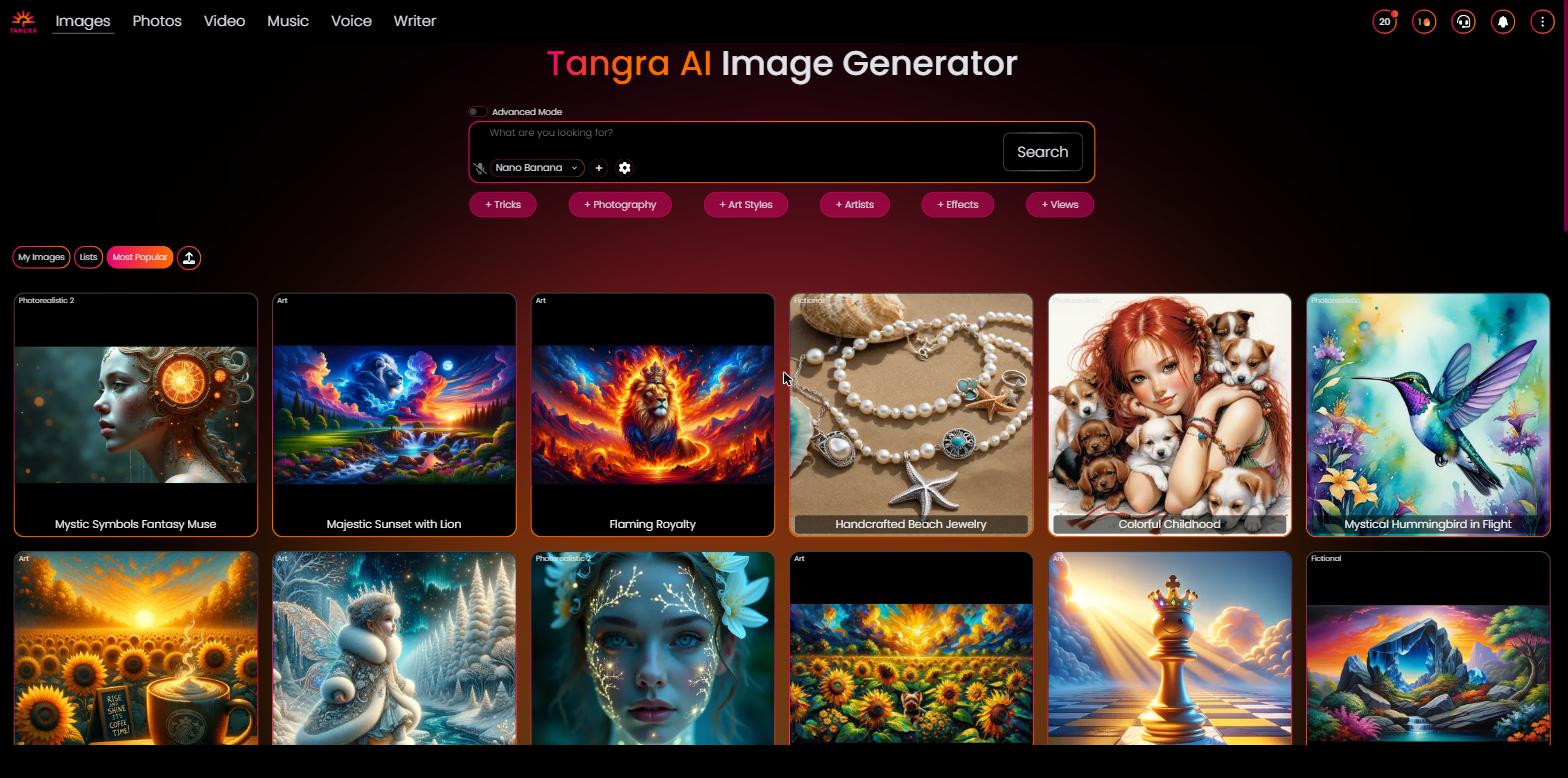
The hero with the gradient 'Tangra AI Image Generator' title, the central prompt input with the model selector and Create button, and a grid of community example images below.

The logged-in workspace showing the prompt input, Advanced Mode toggle, adorner style buttons, credits coin in the header, and the gallery category tabs (My Images, Favorites, Most Popular, Organizer).
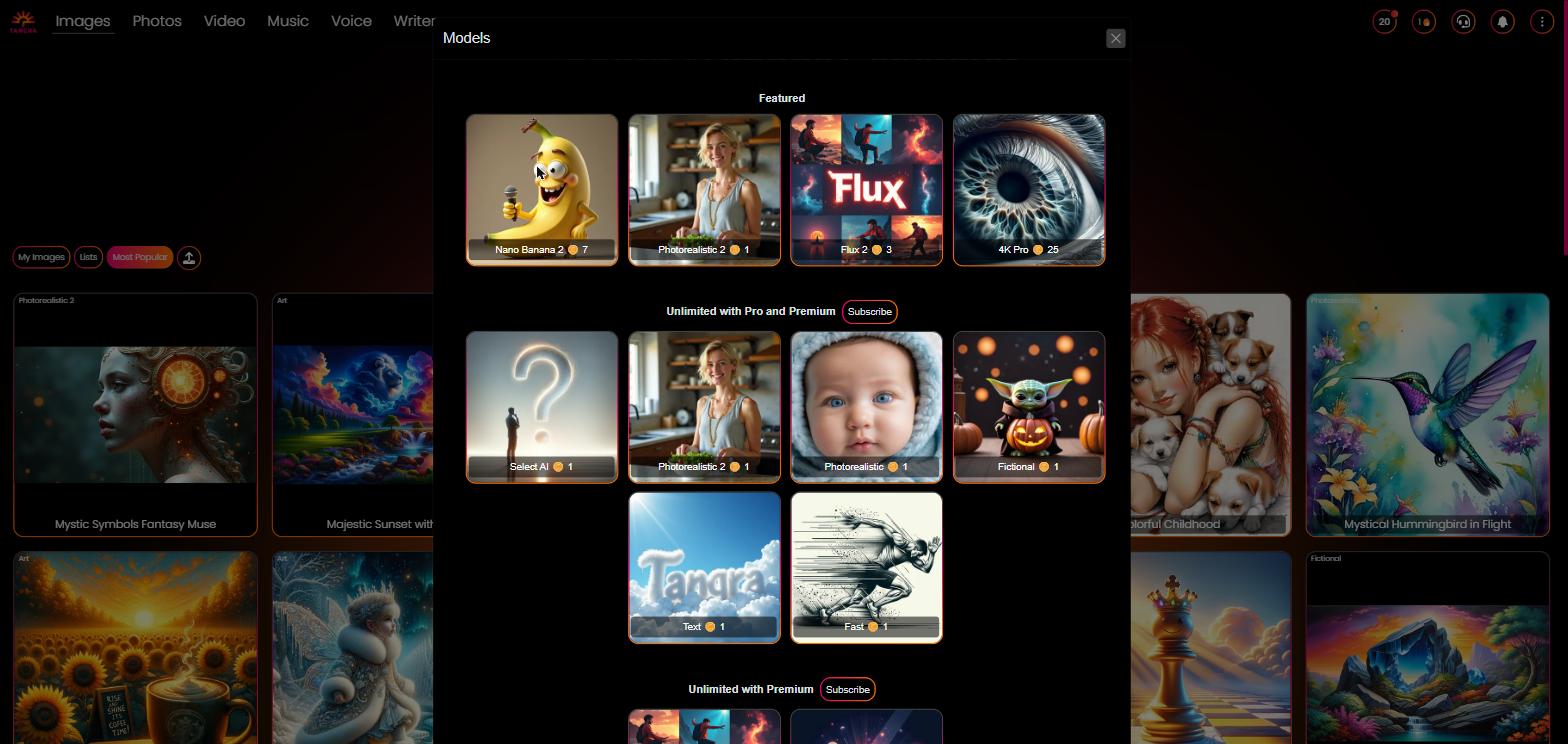
The model picker expanded inside the input, showing model thumbnails, names and credit costs grouped by tier (e.g. Unlimited with Premium, Extra Credits, New).
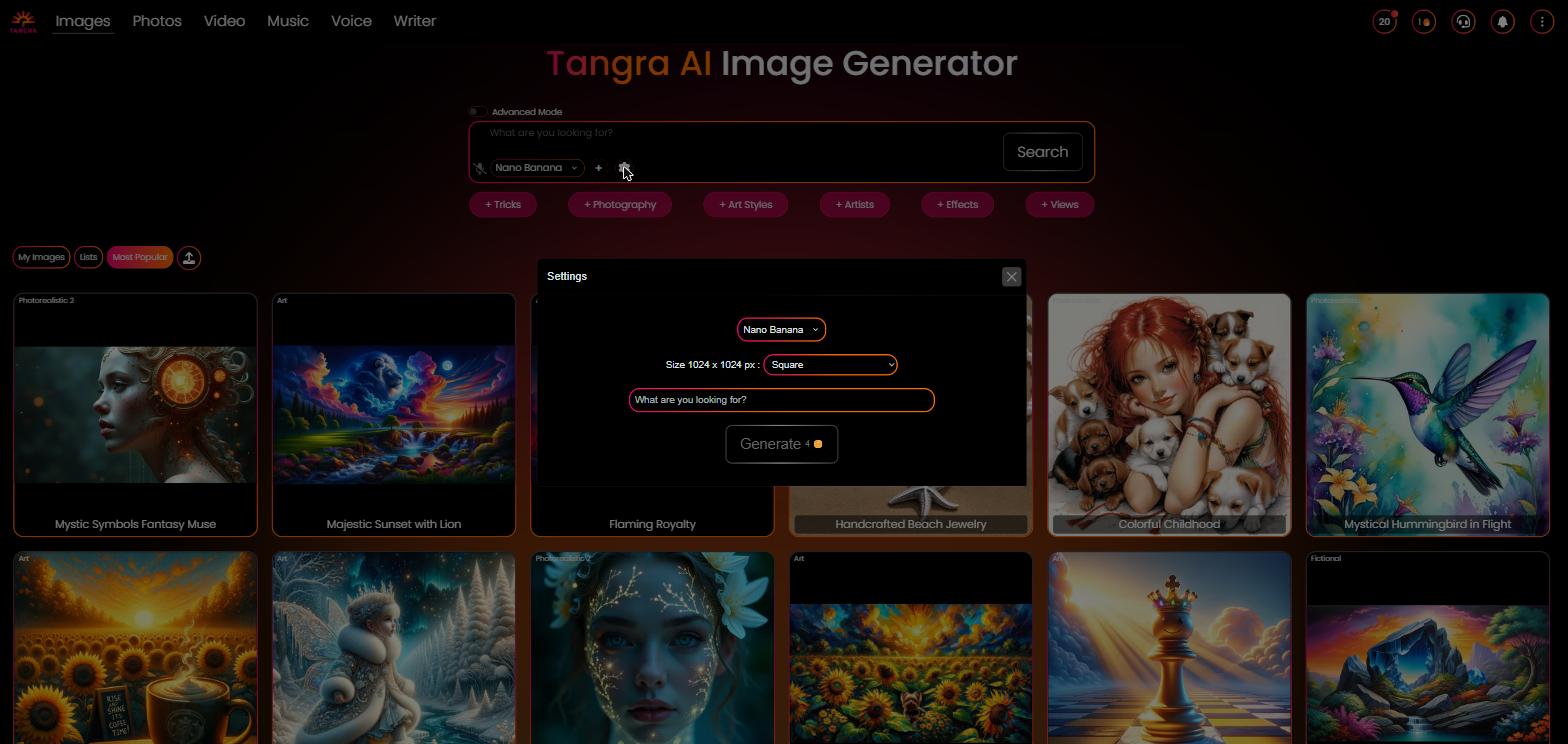
The Settings modal with model thumbnail, size/aspect-ratio dropdown, width/height and steps sliders, Seed toggle, number-of-images selector, and the Create button showing the credit price.

The personal gallery showing finished image tiles plus an in-progress tile with its progress bar, model label, and hover actions (AI Edit, Like).

An image opened full-screen with the control bar: show info, Download, Share, and Next, plus AI Edit and Like actions.

The credits modal showing the current subscription tier, coin balance, Subscribe / Buy more credits buttons, and earn-credits options like the referral share link and games.

A model-specific marketing page that loads the generator pre-set to that model.
Settings & controls
Every control in Image Generator, what it does and the options available:
| Control | What it does | Options |
|---|---|---|
| Advanced Mode toggle | Switches between simple keyword input (Tangra builds the prompt) and a free-form advanced prompt textarea for full control. | Off (keywords) / On (advanced prompt up to ~2000 characters) |
| Model selector | Chooses which AI image model creates the result; shown inside the prompt input and again in the settings panel, with per-model credit cost. | Select AI (auto), Photorealistic, Photorealistic 2, Fictional, Text, Fast, Art, Flux, Flux 2, Flux 2 Pro, Flux 2 Flex, Stable Diffusion XL, GPT Image / Pro / Mini, Nano Banana 2, 4K Pro, Seedream 4.0 / 4.5, Krea, HiDream Full, Titan 2, Pro |
| Size / aspect ratio | Selects the output aspect ratio; available options depend on the chosen model. Common set is Square, Landscape and Portrait, with extra ratios (e.g. 16:9, 9:16, 3:2) and resolution tiers up to 4K on some models. | Square (1024x1024) / Landscape / Portrait / model-specific ratios and 0.5K–4K tiers |
| Width & Height sliders | On supported models, set exact pixel dimensions instead of a preset; the chosen size label updates to 'custom' when off-preset. | 256–2048 px (step 8) on most models |
| Steps slider | Controls the number of diffusion/generation steps on models that expose it, trading speed for detail. | 4–60 (model-dependent default) |
| Seed | Toggle to lock a fixed numeric seed for reproducible results; off uses a random seed each run. | Random (off) / fixed integer (0 to 2^32) |
| Number of images | How many images to create per prompt in Advanced Mode; total credit cost is multiplied accordingly. | Free/trial: 1–2; Premium/Ultimate: 1–6 |
| Style adorners | Tag buttons that append style modifiers to the prompt; selected tags appear as chips you can remove. | Trick, Photography, Art Styles, Artists, Effects, Views |
| Reference images | Attach one or more source images for editing/reference-capable models via upload, drag-drop, paste, gallery pick, or phone-via-QR. | Up to the model's supported count (e.g. up to 14 on Nano Banana 2 / GPT Image / Pro) |
| Gallery category tabs | Switch what the gallery shows below the generator. | Quick results (search), My Images, Favorites, Most Popular, Organizer (paid) |
| Credits / account panel | Coin button in the header opens the credits center showing balance, subscription tier, buy-credits, daily and referral rewards, and account/email management. | Free, Premium, Ultimate (plus trial tiers) |
AI models
Image Generator lets you pick from a curated lineup of AI models — each shows its credit cost in the app. Available models:
Outputs & formats
- PNG download (high-resolution)
- Square 1024x1024 (default)
- Landscape and Portrait presets
- Extra aspect ratios: 16:9, 9:16, 4:3, 3:4, 3:2, 2:3, 21:9 and more (model-dependent)
- Resolution tiers up to 4K on select models (Nano Banana 2, 4K Pro, Seedream)
- Custom width/height up to 2048 px on supported models
- Multiple images per prompt (up to 6 on paid plans)