

Tangra AI Music Generator
Studio-grade AI music and songs with your lyrics, your vocal style, and world-class AI production.
Overview
Tangra AI Music Generator turns a short text description into a complete, copyright-free track in seconds. You can produce instrumental music or full songs with AI-sung vocals, optionally writing your own lyrics or letting Tangra create them for you. Multiple AI music models, a deep library of genres/instruments/moods/vocal-timbre tags and selectable AI singers let you shape the sound, then play, save into playlists, download, share, and even spin tracks into an AI music video.
Who it’s for
- Content creators and YouTubers who need royalty-free background music and theme songs
- Social media creators making Reels, TikToks, and Shorts
- Podcasters needing intros, outros, and stingers
- Marketers and small businesses producing ads and event music
- Songwriters and hobbyists who want to hear their own lyrics produced and sung
- Game developers and streamers needing original looped or themed tracks
Key features
Text-to-music generation
Describe the music or song you want in plain language and create a complete track. A simple mode takes a short prompt; Advanced mode opens a larger prompt box for detailed direction.
Songs with your own lyrics
On Song models you can write your own lyrics in a structured editor (Intro, Verse, Chorus, Bridge, Outro sections) or paste full lyrics in advanced lyric mode. A one-tap auto-generate button writes lyrics or fills individual sections for you. Lyrics are capped at 3000 characters.
Instrumental vs. vocals
Choose a 'Song' model for vocals or a 'Music' model for instrumental-only tracks, so you can produce either fully-sung songs or background/score music.
Genre, instrument, mood, vocal and timbre tags
Build the exact sound from large tag libraries: ~100 genres (pop, rock, hip-hop, jazz, EDM, metal, country, classical, lounge, world and more), dozens of instruments, moods, vocal types, and vocal timbres, each searchable in a picker.
Selectable AI singers
On Song 3.0 you can pick a named AI vocalist (male or female voices like Ethan, Sophia, Olivia, Noah and more) and preview a demo of each voice, or leave it on Auto Vocals.
Built-in player, playlists, library and sharing
Every track plays in a persistent global music player. Save tracks privately, organize them into playlists, browse Most Popular and Quick Results, upload your own audio (and attach lyrics to it), download, and share.
AI music video creator
Turn a generated song into a cinematic AI music video through a guided 5-step wizard: pick video size, choose the music, shape the story, refine the storyline/script, then create visuals.
How to use it — step by step
- Open the Music GeneratorGo to https://tangra.link/music for the landing page, or open the app to start creating. Sign in / create a free account (passwordless email or Google) when prompted to create and save tracks.
- Describe the trackType what you want in the prompt box (e.g. 'upbeat summer pop song about road trips'). Toggle Advanced mode for a larger prompt area and more detailed control.
- Pick an AI modelOpen the model selector and choose a Song model for vocals or a Music model for instrumentals (Song 4.5, Song 4.1, Song 4.0, Song 3.0, Music 4.5, Music 4.0, Music 3.0, Music 2.0), or leave it on Select AI to auto-pick.
- Shape the sound with tagsOpen the tag pickers to add Genre, Instrument, Mood, Vocal, and Timbre tags (choose at least one from each group on the legacy song flow).
- Add or create lyrics (Song models)Choose 'Add your lyrics' to write structured sections (Intro/Verse/Chorus/Bridge/Outro) or paste full lyrics, or use the sparkle button to auto-generate lyrics from your prompt. On Song 3.0 you can also pick a specific AI singer and preview their voice.
- Set your optionsOpen Settings for additional options. The credit cost updates live based on the model and singer choice.
- CreateClick Create. The track is produced and added to your library, then starts playing in the built-in player.
- Play, save, download, share, or make a videoUse the global player to listen, add tracks to playlists, download or share the copyright-free audio, or click 'Music Video' to launch the 5-step AI music video wizard.
See it in action
Screens you’ll work with inside Music Generator:
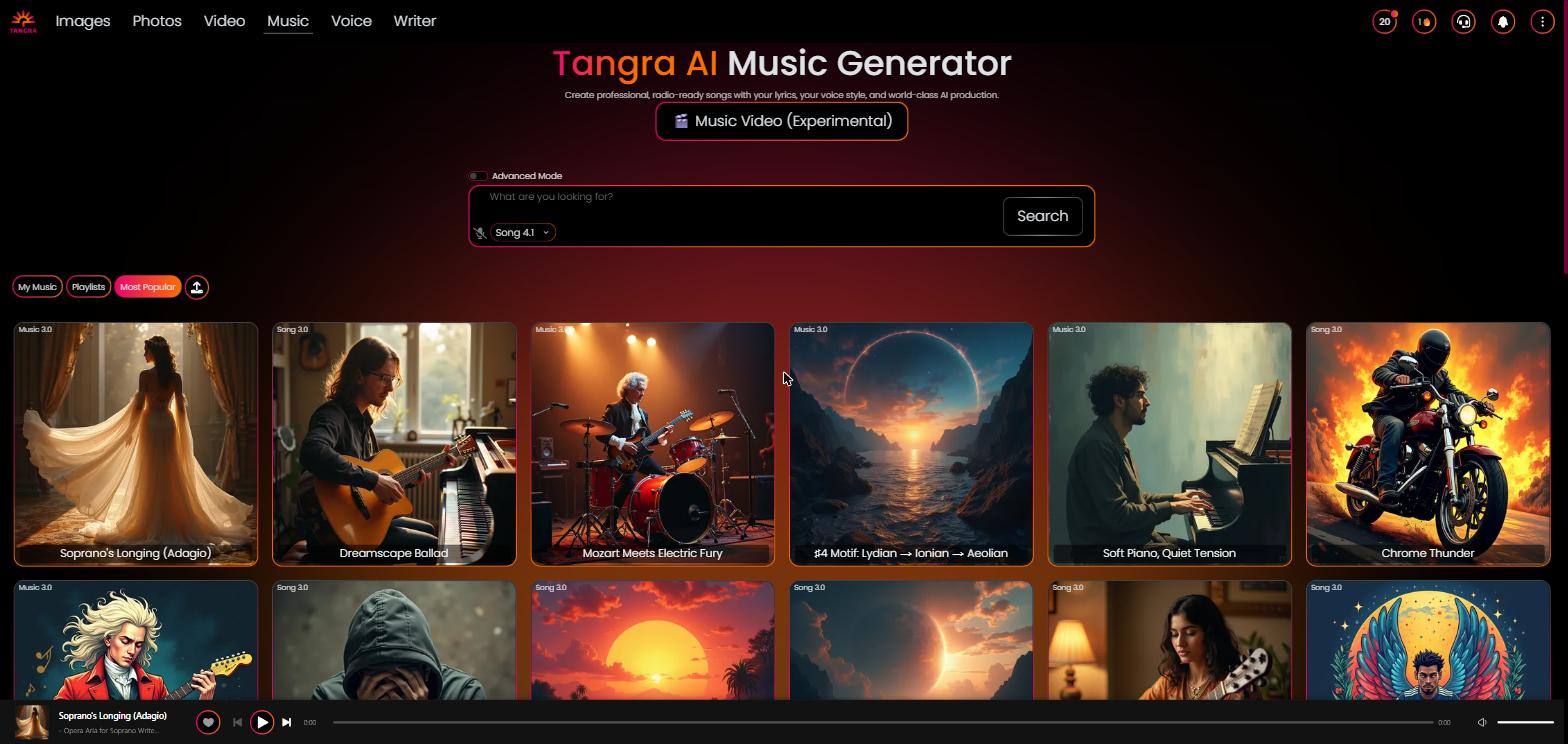
Marketing hero with the headline 'Tangra AI Music' and subtitle 'Create professional, radio-ready songs with your lyrics, your voice style, and world-class AI production', plus the 'Music Video (Experimental)' button, featured tracks, tutorial video, and app-store badges.

The working generator: prompt box with Advanced-mode toggle, AI model selector, tag pickers (Genre/Instrument/Mood/Vocal/Timbre), live credit price, and the Create button.

A Song 3.0 session showing the Singers selector (with voice preview) and the structured lyrics editor with Add Verse/Chorus/Bridge/Outro buttons and the sparkle auto-generate control.

A generated track playing in the persistent bottom player, with the user's track library, Playlists, and Most Popular categories visible.

The 5-step AI music video creator showing the step rail (Video Size, Music, Story, Storyline, Create) on its first step.
Settings & controls
Every control in Music Generator, what it does and the options available:
| Control | What it does | Options |
|---|---|---|
| Advanced mode toggle | Switches between a short keyword prompt and a larger prompt textarea for more detailed creative direction. | On / Off |
| AI model selector | Chooses the music model, which also determines instrumental vs. vocals and base credit cost. | Select AI, Song 4.5, Song 4.1, Song 4.0, Music 4.5, Music 4.0, Song 3.0, Music 3.0, Music 2.0 |
| Genre tags | Pick the musical genre(s) for the track from a searchable list of roughly 100 styles. | e.g. pop, rock, hip-hop/rap, jazz, blues, EDM/house/techno, country, metal, classical/orchestral, lounge, world, k-pop, latin and more |
| Instrument tags | Specify instruments to feature in the arrangement. | e.g. acoustic/electric guitar, piano, drums, bass, strings, synth, brass, saxophone, violin, sitar, ukulele and dozens more |
| Mood tags | Set the emotional tone of the track. | e.g. happy, energetic, romantic, sad, epic, calm, dark, uplifting, nostalgic, dreamy and more |
| Vocal tags | Choose the vocal type/gender for sung tracks. | female, male, child, soprano, tenor, mezzo-soprano, rapping, screamo, squeaky |
| Timbre tags | Fine-tune the vocal character/texture. | e.g. warm, raspy, airy, husky, bright, smooth, gritty, soulful, powerful vocal and many more |
| Singer selector (Song 3.0) | Pick a specific named AI vocalist and preview a demo, or use Auto Vocals. | Auto Vocals or named voices (Ethan, Sophia, Alex, Isabella, Olivia, Noah, Mia, Lucas, Charlotte, Aurora and more), male and female |
| Lyrics editor | Write structured song sections or paste full lyrics, with per-section and full-song AI auto-generation; capped at 3000 characters. | Add Intro / Verse / Chorus / Bridge / Outro; sparkle auto-generate; normal vs. advanced (free-text) mode |
| Music upload | Upload your own audio file into the library and optionally attach lyrics to it. | Upload audio; add/save lyrics or skip |
| Library categories | Switch between views of your tracks and the community library. | My tracks, Playlists, Most Popular, Quick Results (after a search) |
AI models
Music Generator lets you pick from a curated lineup of AI models — each shows its credit cost in the app. Available models:
Outputs & formats
- MP3 audio tracks streamed and playable in the built-in global music player
- Instrumental ('Music' models) or full songs with AI-sung vocals ('Song' models)
- Tracks saved to your private library and organizable into playlists
- Downloadable and shareable copyright-free audio
- Optional: turn a generated song into a cinematic AI music video via the 5-step Music Video wizard